








Capturing revenue events
Contents
We'll remove the Revenue analytics dashboard on or after June 30th, 2026.
We're not stepping away from revenue in PostHog — we're rethinking how it should work. Instead of maintaining a single, opinionated Revenue analytics dashboard, we're focusing on exposing revenue properties on persons and groups so you can use them everywhere: insights, SQL, and persons/groups profiles. Each use case (ecommerce, SaaS, recurring revenue, one-off, services, multi-tenant) can then build the dashboard it actually needs — or have PostHog AI and agents via our MCP build it for you.
You can collect revenue data as PostHog events. This guide walks through what properties to include and how to configure PostHog to use them.
If you already have revenue data in Stripe, you can use it directly in revenue analytics.
Learn more about connecting to a data warehouse source like Stripe.
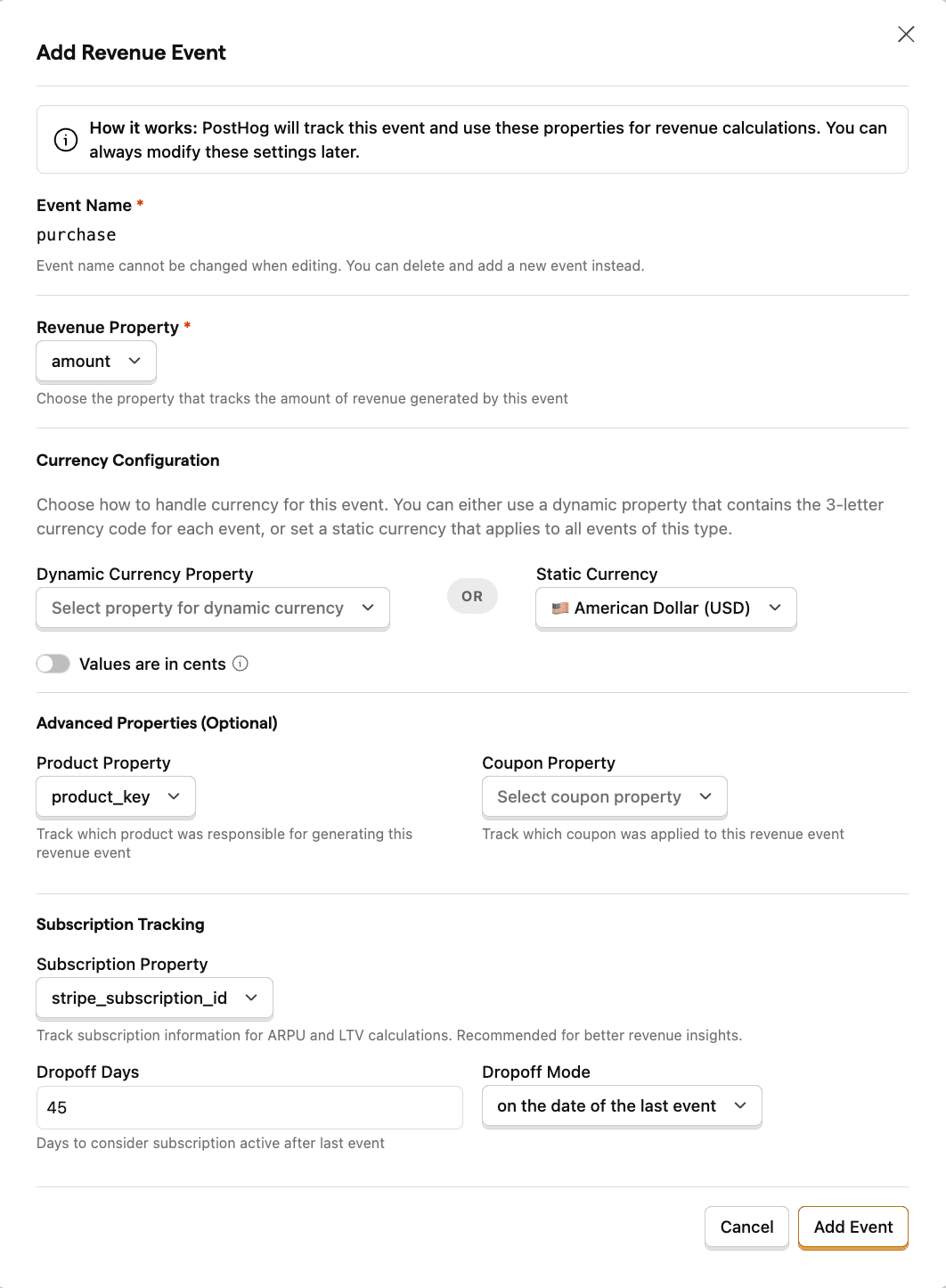
To capture revenue events, include the following properties. Both the actual event and property names don't matter, as you set these later in PostHog:
| Property | Description | Example key | Example value |
|---|---|---|---|
| Revenue property | The amount of revenue generated by the event (usually in their minor unit, such as cents of a dollar, pence of a pound, yen, etc.) | revenue | 1000 |
| Currency property (optional) | The currency of the revenue in ISO 4217 format (USD, EUR, GBP, etc.) - or select a static currency for all events | currency | USD |
| Product property (optional) | The name of the product that the event is related to | product | Premium Plan |
| Coupon property (optional) | The name of the coupon that was used to purchase the product | coupon | SUMMER2024 |
| Subscription property (optional) | An unique identifier for the subscription that the event is related to | subscription_id | sub_1234 |
You can name the properties however you want – you can customize them in the Revenue tab in data management.
The currency property is optional but we still recommend sending it explicitly for future compatibility. You can configure a static currency in your dashboard if you only accept payment in a single currency.
If your product is subscription-based, you can also let us know how we should handle churn by specifying after how much time after the last event for a given subscription we should consider it to have churned. You can also customize whether we consider the user to have churned the day the last event happened or after the dropoff period.
Currency minor unit
You can choose between sending the minor unit of the currency or the decimal amount. For example, the whole amount of $20.45 (as in 20 dollars and 45 cents) would be equal to the minor unit of 2045 (as in 2,045 cents).
While we support both, we recommend sending the minor to avoid floating point precision issues.
When sending the minor unit of the currency, we'll treat it as follows:
1045inUSD(or any other two-decimal currency) is treated as $10.451045inJPY(or any other zero-decimal currency) is treated as ¥1045
Zero-decimal currencies
When you enable "values are in cents" (minor unit), we consider most currencies to be two-decimal currencies unless they are in the following list:
- BIF
- CLP
- DJF
- GNF
- JPY
- KMF
- KRW
- MGA
- PYG
- RWF
- UGX
- VND
- VUV
- XAF
- XOF
- XPF
There's also one exception to the day-to-day usage of each currency, and that's the Icelandic Krona (ISK). The Icelandic Krona (ISK) is a zero-decimal currency, but we treat it as a two-decimal currency to keep backwards compatibility with our integration with Stripe.